
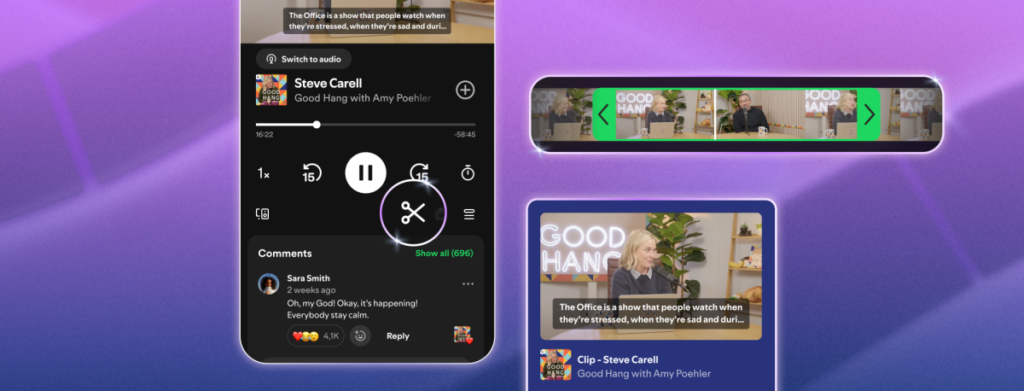



Spotify is rolling out a new “Podcast Clips” feature this Wednesday, allowing users to easily capture, trim, and share specific segments from their favorite shows. This introduction aims to simplify how listeners distribute audio highlights across social media, messaging apps, and professional networks.
How the Podcast Clipping Tool Works
Within the “Now Playing” interface, users will now find a new scissors icon. Tapping this allows you to isolate a specific segment of a podcast episode. The tool includes a trimming function and a preview mode, ensuring you can refine the audio clip before finalizing it for distribution.
Once the clip is ready, the standard share button provides options to send the segment directly, alongside traditional choices such as sharing a link to the full episode, a specific chapter, or a timestamp.
Changing the Landscape of Podcast Consumption
This update is particularly significant as podcasts increasingly become a primary source for breaking news. Tech and AI executives, in particular, have pivoted away from traditional media interviews, preferring long-form podcast appearances to control their narrative and reach specific audiences. Given the length of these episodes, the ability to isolate key soundbites makes it significantly easier for listeners to consume and verify critical information without committing to hours of audio.
Building on Existing Engagement Trends
The move follows the success of Spotify’s “Chapters” feature, which allows users to save and organize longer segments of podcasts. Since its launch earlier this year, Chapters have been saved to playlists over 2 million times per month, signaling a strong user appetite for curating podcast content.
Beyond personal organization, these clips serve as a powerful marketing tool for creators. By highlighting the most compelling moments of an episode, users can effectively drive new listeners to the full show, potentially increasing overall engagement and reach.
Accessibility and Library Integration
All saved clips are automatically stored in your Spotify Library, providing a permanent space to revisit highlights or integrate them into custom podcast playlists. The feature is currently rolling out globally to both free and Premium users on mobile devices, with the company confirming that availability will expand to cover an increasing number of shows over time.

Leave a Reply