




Digital screen-time limits often fail because they rely entirely on willpower. When notifications are easy to ignore or timers can be bypassed with a single tap, staying focused becomes a constant struggle. The Autonomous Key addresses this by introducing a physical barrier to your digital distractions.
How the Physical Lock Works
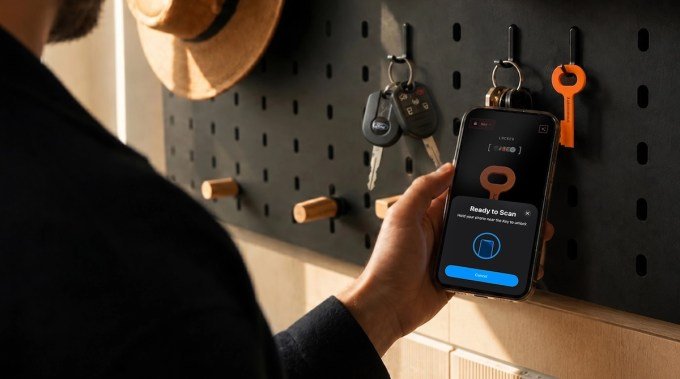
The device is a compact NFC key that pairs with a companion app to restrict access to specific applications. To regain entry to a locked app, you must physically scan the key with your smartphone. Each unlock session grants access for up to 60 minutes before the apps automatically restrict themselves again.
This physical requirement shifts the dynamic of screen time. By leaving the NFC key in another room, at the office, or at the gym, you transform the impulsive habit of opening apps like TikTok or Instagram into a deliberate action that requires genuine effort.
Affordability and Compatibility
At just $9, the Autonomous Key is significantly more affordable than market alternatives such as Blok ($29), Unpluq ($26.50), and Brick ($59). While competitors like Brick offer advanced features—such as Sleep Mode or blocking in-app purchases—the Autonomous Key covers the core functionality for a fraction of the cost.
The hardware is roughly 3 inches long and offers broad compatibility, supporting Android 8.0 or later and iPhones running iOS 15 or later.
AI Insights and User Experience
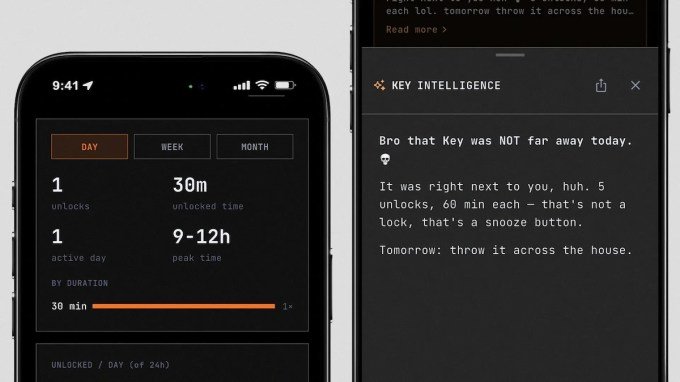
The companion app tracks your habits, providing data on how often you unlock distracting apps and the specific times of day you are most likely to seek them out. The AI interface provides these insights with a notably sassy personality; if you unlock an app immediately after it locks, the AI may suggest that you keep the key in a less convenient location.
Unlike many subscription-based blockers, there are no premium tiers required. A single key can be paired with multiple phones, making it a viable tool for families or users with multiple devices.
Limitations and Current Status
Testing indicates that the NFC scan can occasionally require multiple attempts, suggesting it may not be ideal for locking essential tools like messaging or email. Additionally, if the key is lost, the current workaround requires users to uninstall and reinstall the companion app to regain access.
The company is working on a backup unlock method for a future update. Currently in beta following a successful Kickstarter campaign, the Autonomous Key began shipping this month and is available in five colors: pink, orange, blue, gray, and brown.



Leave a Reply